Gateway Power or Internet Outage Alerts Using Accsense Data Loggers
Share:
Continual Monitoring and Alarming Systems for Healthcare and Industry
CHESTERLAND OH - CAS DataLoggers provides its Accsense wired and wireless monitoring systems to a wide variety of industries including healthcare, the life sciences, and bloodbanks. Using the standard Accsense service level which supports alarm capabilities, you can depend on your system's default behavior to reliably respond to gateway outage alerts as follows:
How are Outage Alarms Configured? - When a new gateway connects to the Accsense servers, the system automatically enables outage alarming for it, sending the alarm notifications to everyone you've added to your default alarm contact list. This means that all you need to do is login, add your contact details to the default alarm contact list, and you will now receive notification of any outage alarms for that gateway.
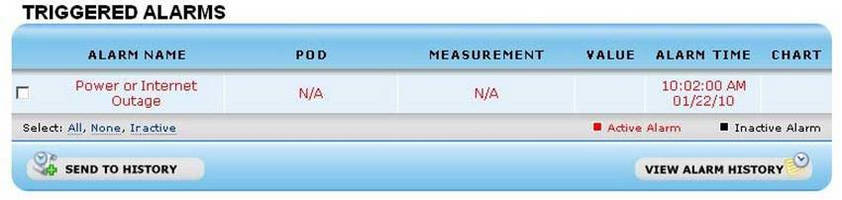
When Will I Receive an Outage Alarm? - You will receive an alarm notification if the gateway has not communicated with the servers in approximately the last 20 minutes (specifically 17-22 minutes). A new entry will also be visible in the 'Triggered Alarms' section when you log into the servers. The entry will either be shown in red (active), meaning the servers have still not received any communication from the gateway since the alarm was raised, or black (inactive), meaning communication with the gateway has now been reestablished.
The 'Alarm Time' column tells you the last time that the gateway successfully communicated with the server (not the time that the alarm was raised and notifications were sent). You will not receive further notifications of the failure so long as no further communication with the gateway occurs, and you do not send the active alarm to your alarm history.
What if Communication with the Gateway is Restored? - If the servers receive a successful communication from the gateway, the red (active) alarm entry will turn black. The system will now resume normal outage monitoring, raising another alarm and sending out notifications in case communication with the gateway fails again. This means that if the gateway's connection is failing intermittently with a period of 20 minutes or more between successful connections, you will receive a series of alarm notifications since the system will regard each failure as a separate occurrence of the alarm.
What if I Send an Active Alert to the Alert History? - By doing this you are telling the system that the alarm condition is dealt with. The system will resume normal monitoring and if the alarm condition still exists or repeats, it will raise a new active alarm entry and send out notifications.
How do I Permanently Disable Outage Alarming for a Gateway? - You can do this by logging on to the website and clicking the 'Clock' icon to the right of the gateway in question. Uncheck the 'Alarm Enabled' checkbox and click 'OK'.
For more information on our Accsense wired and wireless systems for continual monitoring and alarming for temperature/humidity and other values, or to find the ideal solution for your application-specific needs, contact a CAS Data Logger Applications Specialist at (800) 956-4437 or visit the website at www.DataLoggerInc.com.
Contact Information:
CAS DataLoggers, Inc.
12628 Chillicothe Road
Chesterland, Ohio 44026
(440) 729-2570
(800) 956-4437
sales@dataloggerinc.com
www.dataloggerinc.com