Delcam Offers Cost-effective Reverse Engineering with PowerSHAPE Pro
Share:
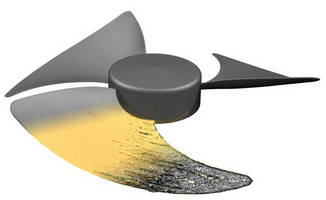
Delcam has taken reverse engineering software to a new level of affordability by combining the functionality from its CopyCAD reverse engineering package into the 2011 release of its PowerSHAPE Pro CAD system. This extended range of functionality, which will be supplied automatically to all users on maintenance, is ideal both for the creation of CAD models from all types of digitised scan data, and for the re-engineering of existing products into improved or customised designs. The complete package is priced at about one third of the cost of current reverse engineering systems with similar functionality. Full details on the new release can be seen on Delcam TV at http://www.delcam.tv/delcam-video.asp?VideoId=142.
PowerSHAPE Pro is still the only CAD software to offer "Tribrid Modelling"; the addition of triangle modelling to the combination of surface and solid modelling that is offered in many other CAD packages as "hybrid modelling". Having all the different modelling techniques in a single package reduces the need to transfer data between multiple programs and so streamlines the whole product development process. The extended range of functionality, for example, the ability to undertake Boolean operations between triangle meshes and solids or surfaces, makes PowerSHAPE Pro ideal for the re-engineering of existing products into improved designs or for creating bespoke products, for example, for individual patients in the healthcare industry.
With Tribrid Modelling, PowerSHAPE Pro offers a flexible and pragmatic approach that allows the design intent to be captured from the physical model rather than simply producing a duplicate digital representation. This is particularly important when generating models from items that might be worn or damaged, and in cases where the quality of the initial data is less than perfect. Three techniques can be used to convert the scan data into the CAD model, based on key points, surface patches or surface sketching.
The first technique is most suitable when creating simple geometric entities. PowerSHAPE Pro can use the positions of key points to create arcs and lines, and then convert them into the full range of prismatic solids. This approach will usually be much quicker than methods based on a complete scan of the object. To produce simpler geometry, for example, surfaces that are perfectly flat or cylinders that are perfectly round, might otherwise require considerable editing of the triangle file to compensate for any defects in the physical part or any errors in the scan data collected.
For more complex shapes, PowerSHAPE Pro now contains all the sculpting and model repair tools previously available in CopyCAD to edit triangle files. These tools allow uneven surfaces to be smoothed out, gaps in the data to be filled, and extra points to be added in areas where only sparse data has been collected.
The edited triangle data can then be converted into the component features. The user has total control over the way the complete data set is divided into the various elements. Each area can then be converted into CAD data by generating a network of curves and then projecting it onto the mesh of triangles. A single surface is generated within the complete set of curves, using PowerSHAPE's unique Smart Surfacing functionality to analyse the curves and determine automatically the most appropriate way to create the surface. If the user is unhappy with the automatic selection, or is simply curious to see other options, he can scroll through the alternative solutions.
The third approach allows the user to sketch onto the surface of the triangle file and use the resulting lines to create the geometry. This can be done by rotating or extruding a single line to create a surface, or by sketching two or more cross-sections and then flowing a surface between them.
The solid model can then be completed with the wide range of filleting and blending options within PowerSHAPE Pro. These allow the creation of consistent, smooth fillets and blends, rather than the sets of complex, free-form patches, often with inconsistent radii, that would be produced from the scan data in a conventional reverse engineering system.
At any stage in the process, analysis tools are available to display the differences between the triangle mesh and the model created in PowerSHAPE Pro. This will highlight any areas that are outside the required tolerance.
In cases when the scan data only represents the external surfaces of the component, PowerSHAPE Pro's solid modelling tools can be used to produce a complete model. First, the external surfaces can be offset by the material thickness to generate the internal surfaces. Extra geometric features, such as reinforcing ribs and bosses for fixing, can then be added to complete the design.
The integrity of the final solid model can be checked with the Solid Doctor options within PowerSHAPE Pro. This can tackle automatically the most common problems that may occur when building CAD models, including gaps and overlaps between surfaces, and duplicated or missing surfaces. The completed model can then be used by Delcam's full range of software for downstream operations, including tooling design, machining and inspection.
For further information on PowerSHAPE Pro, please contact:-
Peter Dickin, Marketing Manager
Direct phone: 44 (0)121 683 1081
e-mail: marketing@delcam.com
Delcam plc
Small Heath Business Park,
Birmingham, B10 0HJ, UK
www.delcam.com