Remote Control enables wireless rebooting from anywhere.
Share:
Press Release Summary:
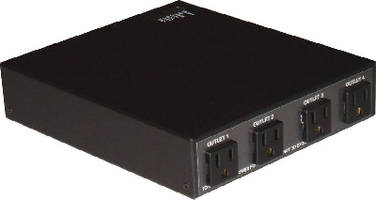
Utilizing paging network, Model RC4 can reboot any electrical device via touchtone phone or computer with Internet connection. Unit is fully functional with Flex or POCSAG systems, and on all frequencies, including VHF, UHF, and 900 MHz. Device contains 4 outlets, which can be controlled individually, or as whole to control power on/off, or reboot devices. Featuring 120 Vac input power with 10 A max, control has internal antenna, but can accept external option.
Original Press Release:
Simple Solution to Wireless Rebooting from Anywhere
The RC4 unit provided by RAVEN Systems is a compact reliable way to remotely reboot electrical systems. Utilizing a paging network, the RC4 unit can reboot any electrical device by using a touchtone phone or a computer with an internet connection. Equipped with 4 outlets, control multiple devices easily with one RC4 unit.
No more expensive phone and data lines will need to be used for accessing remote locations. The RC4 also becomes ideal for IP backup or locations where no internet connection can be found. The RC4 allows the wireless reboot of a device from the comfort of a desk, office, or your home in seconds using a paging network.
Digital paging technology is effective, low cost, and proven reliability by the use of emergency professionals everywhere. The unit is fully functional with Flex or POCSAG systems, and on all frequencies including VHF, UHF, and 900MHz. With this technology you also gain the ability to control multiple units at the same time. Send one command to activate individual outlets, or multiple RC4 units programmed in a specific group. Using the RC4 simply involves making a phone call.
The RC4 unit is fully functional right out of the box and simple to use. There is no need for any pesky software installs or long set up procedures. The RC4 contains 4 outlets which can all be controlled individually, or as a whole to control power on or off, or reboot devices. In the reboot command, power is turned off for a set time, then restored to allow reboot of your device.
The input power is 120V AC with a 10 amp max. The 4 outlets have a 10 amp max per outlet as well. The unit is FCC approved. All units have internal antennas, but are capable of having an external option.
Contact RAVEN Systems or visit wirelessreboot.com